
Choosing the right QuickBooks Online plan can save you time and money. This guide breaks down Simple Start, Essentials, Plus, and Advanced so you can pick the best plan for your business without paying for features you don’t need.
Which QuickBooks Online Plan Should You Buy in 2026?
What is QuickBooks Online?
QuickBooks Online is one of the most widely used accounting software platforms in the U.S. It’s designed to help businesses manage their bookkeeping in one place, including tracking income and expenses, sending invoices, reconciling bank transactions, and generating financial reports.
Because QuickBooks Online is cloud-based, you can access your data anytime, anywhere, on any device (as long as you’re connected to the internet). Your information is automatically backed up, and updates are applied for you, so you’re always using the latest version of the software.
QuickBooks Online also allows you to give access to your accountant or bookkeeper, which makes collaboration easier and helps ensure everyone is working from the same numbers.
The software is available in several plans, each offering different features, user limits, and reporting capabilities. Choosing the right plan depends on how complex your business is and what tools you actually need.
QuickBooks Online Plans Explained (2026 Overview)
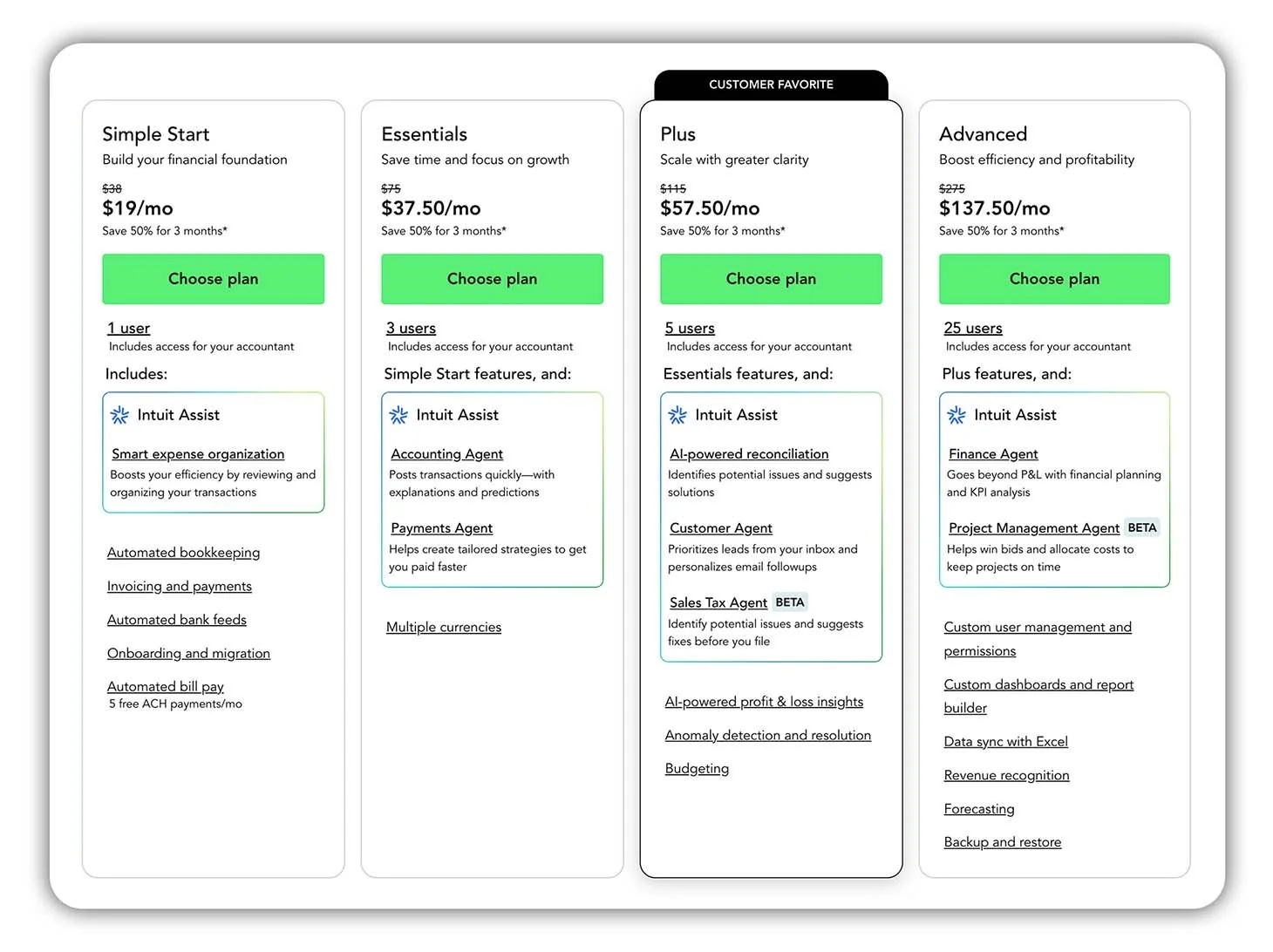
Side-by-side comparison of QuickBooks Online plans for 2026.
QuickBooks Online offers four main plans in 2026: Simple Start, Essentials, Plus, and Advanced. Each plan builds on the previous one by adding more features, more users, and more advanced reporting.
At a high level, the differences between plans come down to three things:
How many users can access the account
How complex your business operations are (e.g. Multiple Currencies, Inventory or Projects)
How detailed your reporting needs to be
If you’re a sole trader or very small business, you may only need the basics. As your business grows, you might need to add features like inventory tracking, project management or custom user permissions which are only available on higher-tier plans.
Below, we’ll walk through each QuickBooks Online plan individually so you can see:
who it’s best suited for
what key features it includes
when it’s worth upgrading (or not)
QuickBooks Online Simple Start
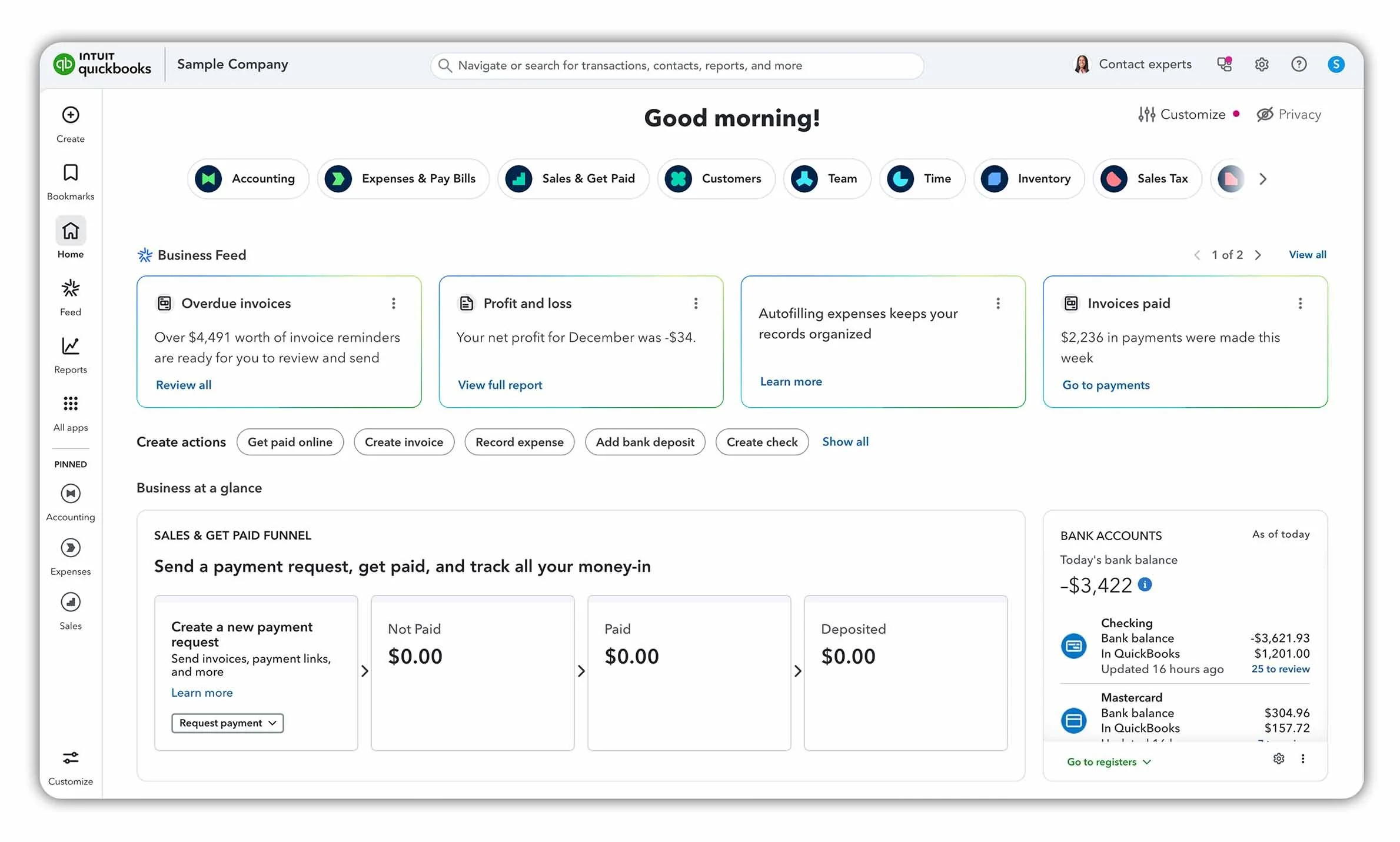
The QuickBooks Online Dashboard in 2026.
Who Simple Start is best for
Simple Start is best suited to sole traders and very small businesses that only need basic bookkeeping features such as invoicing, expense tracking, and bank reconciliations.
Cost
At $38 per month, Simple Start is the cheapest QuickBooks Online plan and is designed as an entry-level option for new businesses.
Please note that prices are current at the time of writing and may vary depending on promotions.
Key features included
Automated bank feeds
Smart expense organisation
Invoicing and payments
Basic financial reports (Profit and Loss, Balance Sheet)
QuickBooks Online mobile app
Limitations to be aware of
Only one user (plus your accountant or bookkeeper)
Single-currency support only
No time tracking
No inventory tracking
No project management
No budgeting tools
QuickBooks Online Essentials
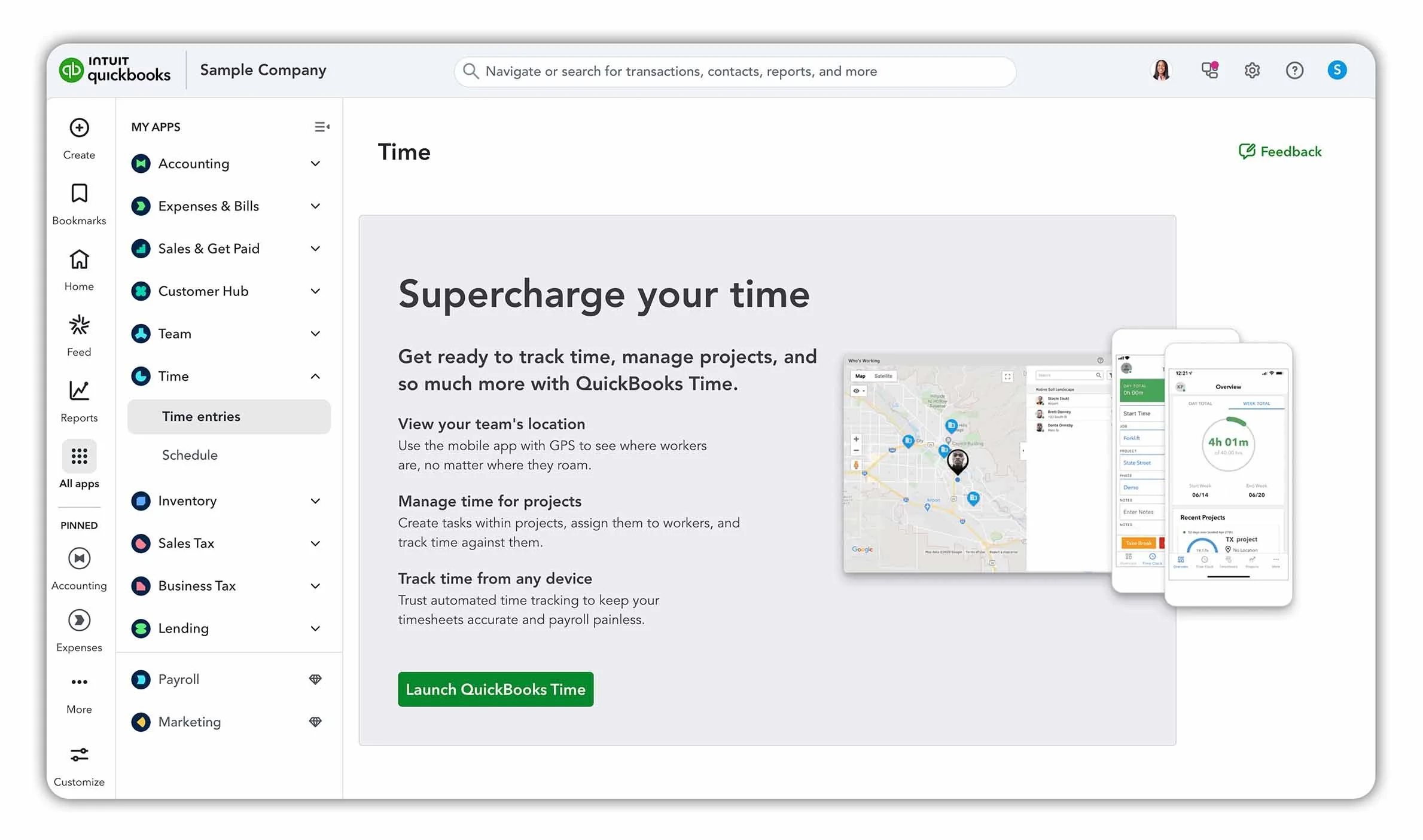
Time tracking in QuickBooks Online.
Who Essentials is best for
QuickBooks Online Essentials is best suited to small service-based businesses that need more than one user and don’t sell physical products. It’s a good fit if you’re working with a team or billing clients for time.
Cost
At $75 per month, Essentials sits one step above Simple Start and includes up to three users, plus access for your accountant or bookkeeper.
Key features included
All features included in Simple Start
Up to three users (plus your accountant)
Multi-currency support with automatic currency conversions
Time tracking by client or project
Basic user permissions
Up to three sales channels
Enhanced reports (including Accounts Receivable and Accounts Payable ageing summaries)
Limitations to be aware of
No project management features
No inventory tracking
Not ideal for product-based businesses
QuickBooks Online Plus
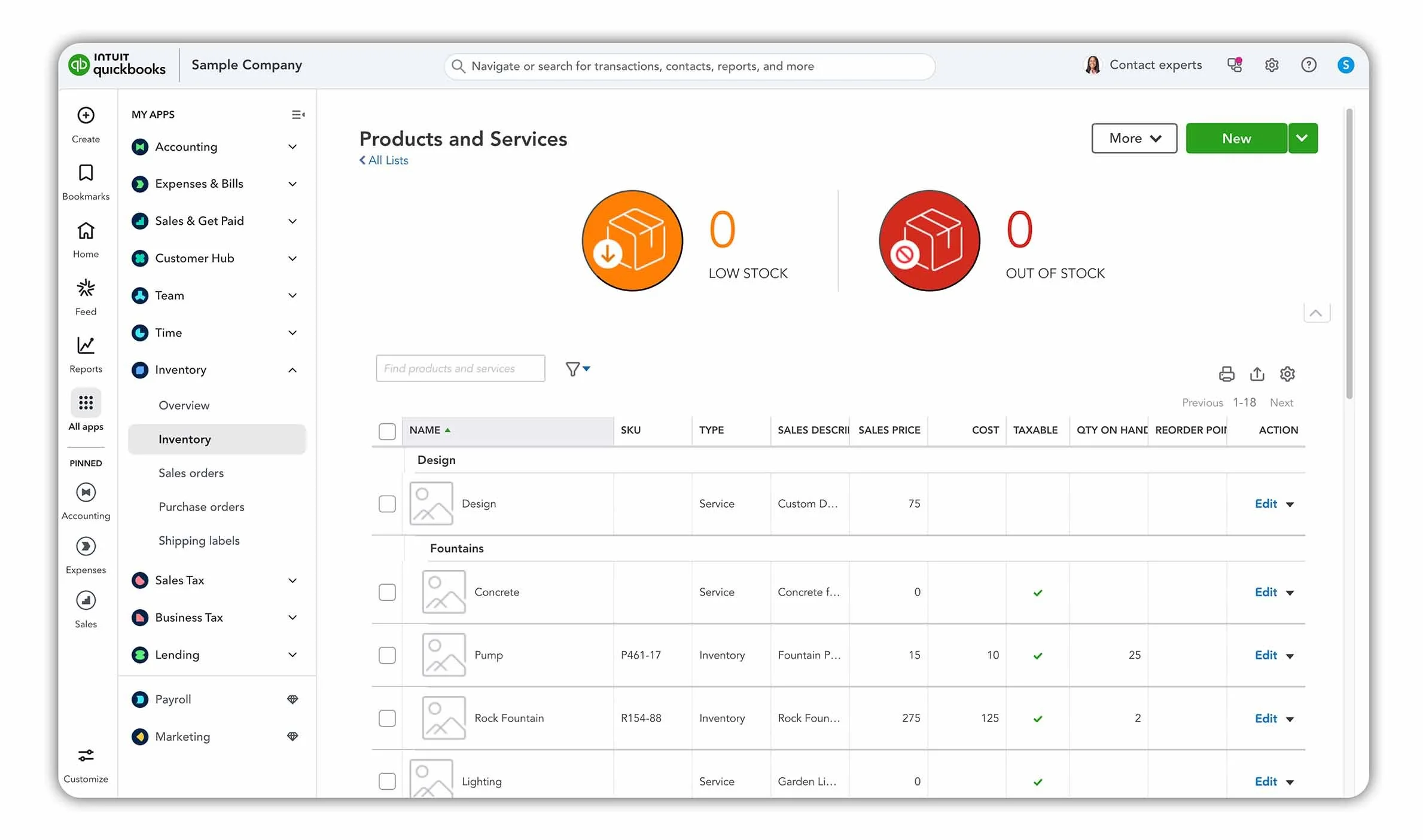
Inventory in QuickBooks Online Plus.
Who Plus is best for
QuickBooks Online Plus is best suited to small to mid-sized businesses with growing teams, especially those that sell physical products or need to track profitability by job or project.
Cost
At $115 per month, Plus sits above Essentials and includes up to five users, plus access for your accountant or bookkeeper.
Key features included
All features included in Essentials
Up to five users (plus your accountant)
Inventory management, including product tracking and automatic cost of goods sold calculations
Purchase order creation for restocking inventory
Project tracking to monitor income, labour, expenses, and payroll by job
Budgeting tools
Access to all available sales channels
Advanced reports (including inventory, sales, and profitability reports)
Limitations to be aware of
No advanced automation or custom user roles
May be more than needed for very small or service-only businesses
QuickBooks Online Advanced
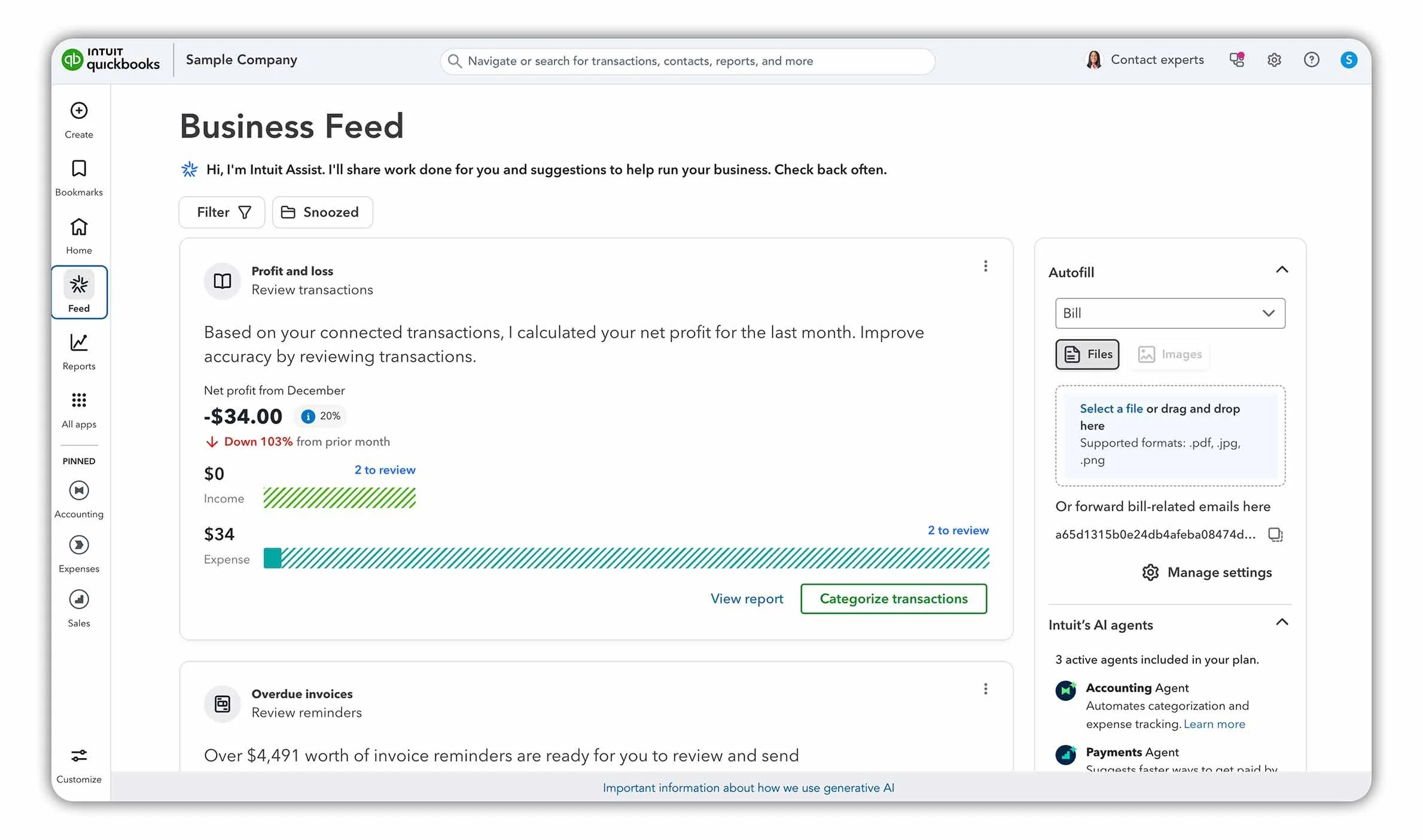
QuickBooks Online Business Feed.
Who Advanced is best for
QuickBooks Online Advanced is best suited to growing businesses with larger teams that need more control, automation, and deeper financial reporting. It’s designed for businesses with more complex workflows and internal approval processes.
Cost
At $275 per month, Advanced is the highest-tier QuickBooks Online plan and supports up to 25 users, with access for your accountant or bookkeeper included.
Key features included
All Plus features
Up to 25 users with custom roles and permissions
Workflow approvals and automation to reduce errors and internal risk
Custom management reports to track key performance indicators
Data syncing with Excel for deeper financial analysis
Forecasting tools to help project future performance
Backup and restore functionality
Priority support for faster assistance
Limitations to be aware of
Significantly more expensive than other plans
Feature set may be unnecessary for small or simple businesses
More setup and configuration required to get full value
Which QuickBooks Online Plan Is Right for You?
The right QuickBooks Online plan depends on the size of your business and the features you actually need day to day. Rather than choosing the “best” plan, it’s usually smarter to choose the simplest option that still covers your requirements.
Here’s a quick way to think about it:
Simple Start is best if you’re a freelancer, gig worker, or solo consultant with no employees. If you just need basic invoicing, expense tracking, and reports, this plan will usually be enough.
Essentials is a good fit for service-based businesses that need more than one user. It works well if you’re billing clients for time, working with a small team, or dealing with multiple currencies.
Plus is the minimum plan you’ll need if you sell physical products or manage projects. Inventory tracking, project profitability, and budgeting tools make this plan better suited to growing businesses.
Advanced makes sense for mid-sized and growing businesses that need more users, stronger controls, automation, and customised reporting. It’s designed for more complex operations rather than small businesses just starting out.
Get 50% on QuickBooks Online for 3 Months
If you’ve decided which plan makes the most sense for your business, you can take advantage of the current QuickBooks Online promotion. Click the link below to get 50% off your QuickBooks Online plan for three months.
Does QuickBooks Online Include Payroll?
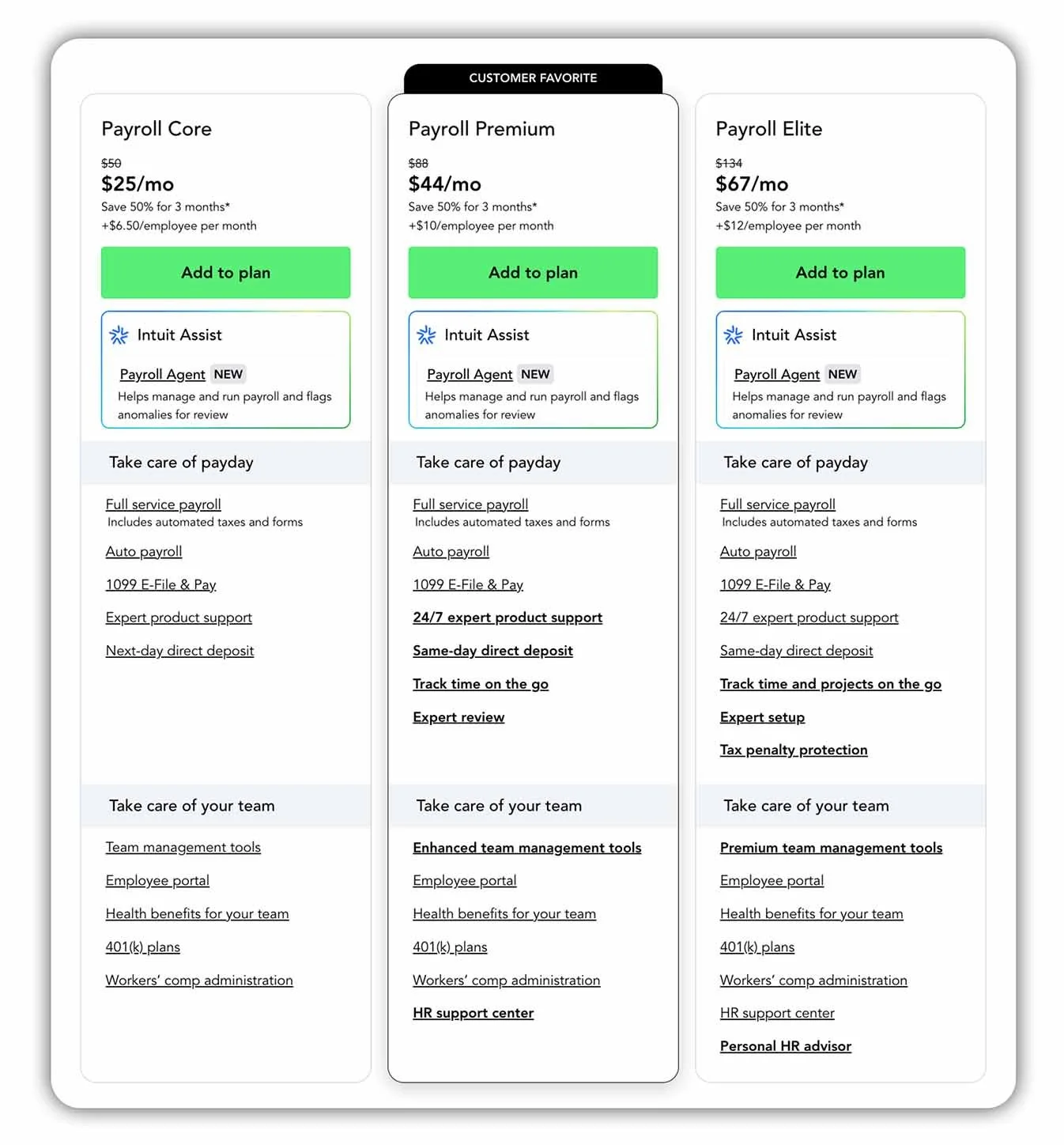
Side-by-side comparison of QuickBooks Online Payroll plans for 2026.
Payroll is not included with any QuickBooks Online plan by default. Instead, payroll is offered as an optional add-on, which means you can choose whether to include it based on your business needs.
For example, even if you’re using Plus or Advanced, you’ll still need to decide whether to add payroll, or continue without it if you don’t have employees.
QuickBooks Online offers three payroll add-ons:
Payroll Core
Payroll Core is the most affordable option. It costs $50 per month, plus $6.50 per employee per month, and includes:
Automated payroll tax calculations
Filing of payroll taxes
Next-day direct deposit
This option works well for small businesses that want a straightforward way to run payroll without extra support features.
Payroll Premium
Payroll Premium costs $88 per month, plus $10 per employee per month. In addition to Core features, it includes:
Same-day direct deposit
24/7 support via chat or phone
This plan is better suited to businesses that value faster payments and more accessible support.
Payroll Elite
Payroll Elite is the most comprehensive option. It costs $134 per month, plus $12 per employee per month, and includes:
Guided setup with a QuickBooks payroll expert
All Premium features
Tax penalty protection of up to $25,000 per year
Elite is designed for businesses that want hands-on support and extra protection around payroll compliance.
Can You Change QuickBooks Online Plans Later?
Yes, you can upgrade or downgrade your QuickBooks Online plan at any time as your business needs change.
If your business grows and you need additional features like inventory, projects, or more users, you can upgrade to a higher plan. Likewise, if your needs become simpler, you can move to a lower plan.
Plan changes are handled directly inside QuickBooks Online and typically take effect immediately or at the start of your next billing period, depending on the change.
This flexibility means you don’t have to overcommit upfront. Many businesses start on a lower plan and upgrade later as their operations become more complex.
Final Thoughts: Picking the Best QuickBooks Online Plan
There’s no single “best” QuickBooks Online plan for everyone. The right choice depends on how your business operates today and which features you actually need.
If you’re just getting started, it usually makes sense to begin with a simpler plan and upgrade later as your business grows. Paying for features you don’t use won’t save you time or money, and QuickBooks Online makes it easy to move between plans as your needs change.
As a general rule:
Choose Simple Start if you only need the basics
Step up to Essentials if you need multiple users or time tracking
Go with Plus if you sell products or manage projects
Consider Advanced only if your business needs more users, automation, and detailed reporting
If you’re still unsure, think about the next 6–12 months of your business rather than just today. That usually makes the decision clearer.
Whichever plan you choose, the most important thing is using your accounting software consistently and accurately. That’s what ultimately gives you better visibility over your finances and helps you make smarter business decisions.