
How to use Xero (2026)
Welcome! If you’ve logged into Xero lately and felt a little disoriented, you’re not alone. The platform has continued to evolve heading into 2026, and some parts may not be where you expect them to be. This guide breaks down the latest changes and shows you how to move around Xero confidently. Whether you’re opening Xero for the first time or returning after a break, you’ll find everything you need right here.
In this short tutorial, I explain how to use the latest version of Xero in 2026.
What is Xero?
Xero is cloud-based accounting software that helps small businesses manage their finances online. It’s designed for tasks like invoicing, tracking expenses, reconciling bank transactions and generating financial reports. You access Xero through your web browser or mobile app, with no software installation required.
Because Xero is online, your accounting data updates in real time and stays securely stored in the cloud. This makes it easy to work on your books from anywhere and switch between devices without losing information.
Key features of Xero include:
Online access: Use Xero on a PC, Mac, tablet, or smartphone, with your data always up to date.
Automatic bank feeds: Connect your bank accounts so transactions import directly into Xero, reducing manual data entry.
Accounting automation: Set up repeating invoices, track bills, and generate reports automatically to save time.
Accountant collaboration: Give your accountant or bookkeeper secure access so everyone works from the same numbers.
App integrations: Connect Xero with popular third-party apps for payments, payroll, inventory, and more.
Overall, Xero is an easy-to-use accounting solution for small businesses that want to simplify bookkeeping without relying on spreadsheets or complex accounting systems.
Friendly tip: Are you new to Xero? Start a free trial using my affiliate link to follow along with this guide and get hands-on with the updated Xero interface.
Which Version of Xero Is Right for You?
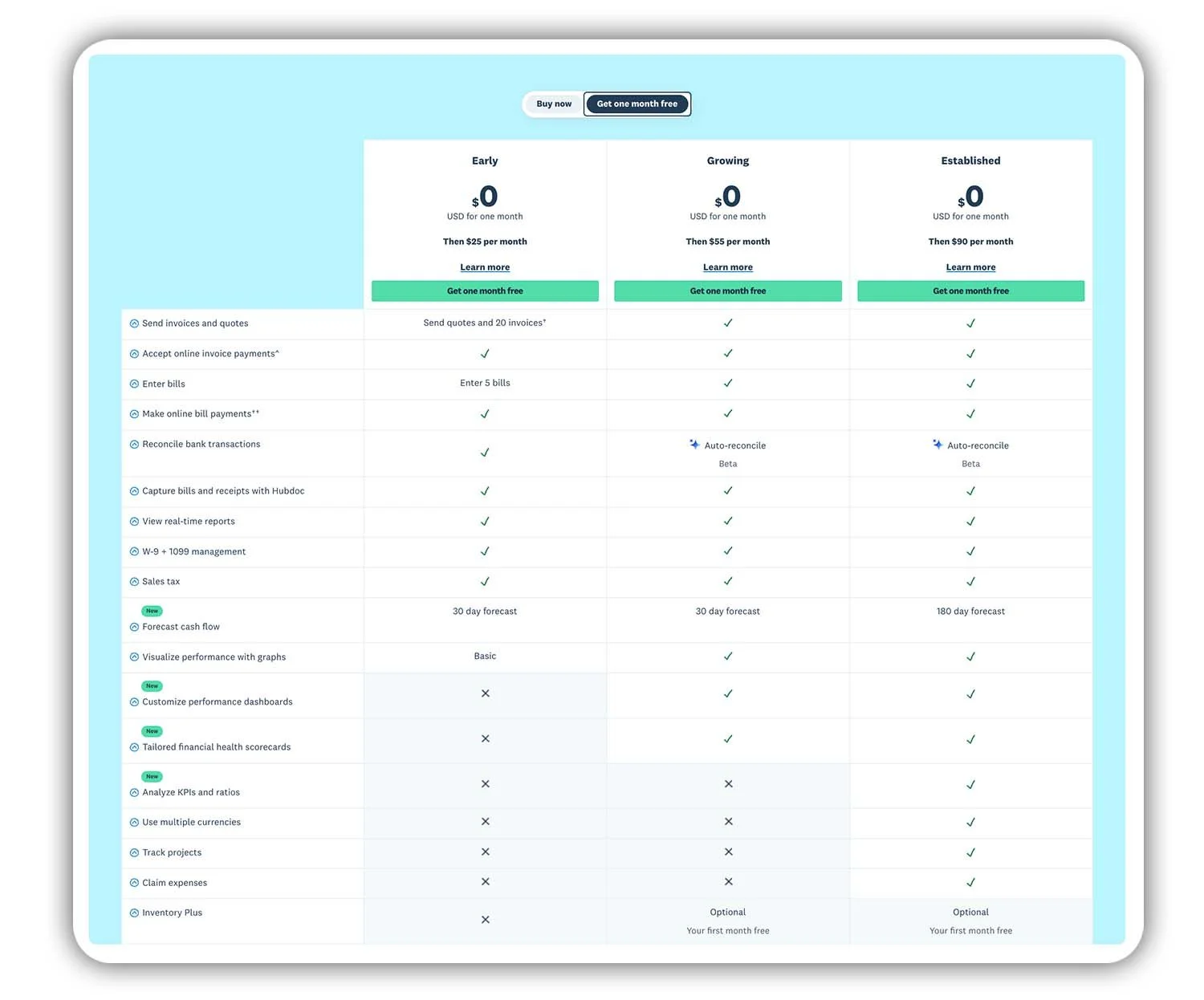
A side-by-side look at Xero’s pricing plans, from Early to Established.
Xero offers three main subscription plans, each designed for different stages of business growth. Choosing the right plan helps you get the features you need without paying for tools you won’t use. Here’s a quick breakdown of the Xero plans available:
Xero Early
This is the entry-level plan for new or very small businesses with simple accounting needs. It’s suited to businesses that send a limited number of invoices and bills and mainly want basic expense tracking and bank reconciliation. If you’re just getting started and want a low-cost way to keep your books organised, Early is a good place to begin.
Xero Growing
Growing is the most popular option for small businesses. It removes the limits found in the Early plan and gives you full access to invoicing, bills, bank reconciliation, and standard financial reports. This plan is ideal if your business is picking up activity and you want fewer restrictions while still keeping things simple.
Xero Established
This plan is designed for businesses that need advanced features and deeper financial insights. It includes everything in the Growing plan, plus tools like multi-currency support, project tracking, and more detailed reporting. If you operate internationally, manage projects, or want greater visibility over your finances, Established is the best fit.
Not sure which Xero plan to choose? If you’re just getting started, the Early or Growing plan is usually enough, and you can upgrade later as your business grows. Your data stays intact when you change plans, so there’s no need to start over. Xero also offers free trials and discounts for new users, making it easy to test a plan and see which one works best for your business.
Affiliate disclosure: We may earn a commission if you sign up for Xero through our link, at no extra cost to you.
Quick tip: All Xero plans include free accountant access, so your bookkeeper or accountant can log in directly and work from the same data.
Save 90% on Xero for 6 Months
Click the link below to get 90% off your Xero plan for your first 6 months.
Exploring the Xero Interface in 2026
Let’s take a look at the Xero interface and how it works in 2026. If you’ve used Xero before, you’ll notice that while the overall flow is familiar, the layout and navigation have been refined to make everyday tasks easier to find. If you’re new to Xero, the updated interface is designed to be clean and straightforward, so you can get comfortable quickly.
When you log in to Xero, you’re taken to the Dashboard. This is your starting point and gives you a quick snapshot of your business’s key financial metrics. The dashboard typically shows bank account balances, cash flow information, invoices owed to you, bills you need to pay, and other key financial summaries, helping you see what needs attention at a glance.
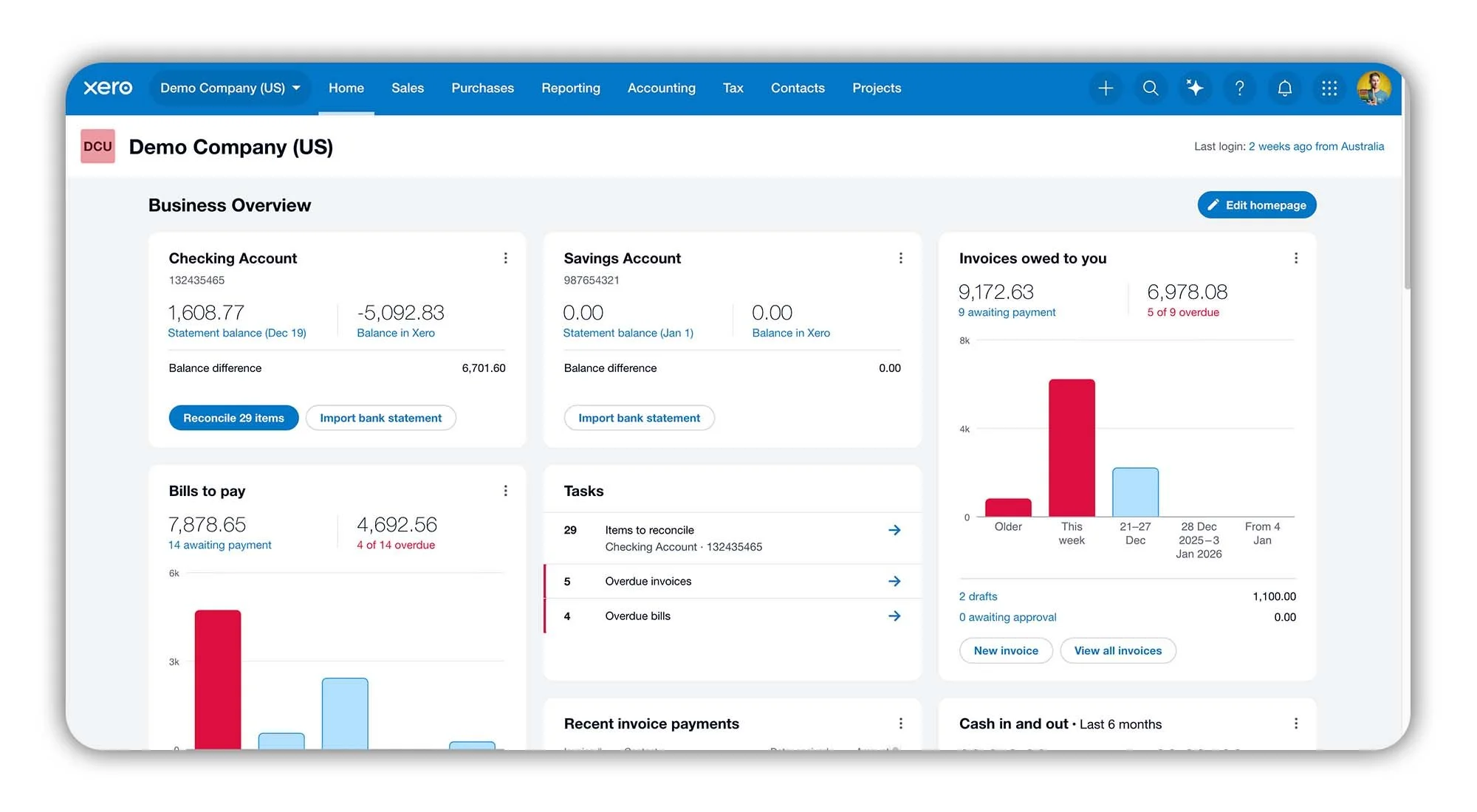
The Xero dashboard in 2026, showing the updated layout.
At the very top of the screen, you’ll see a toolbar spanning the width of the page. On the left side, you’ll find your company name. In the centre, there’s the Smart Search bar. And on the right, you have links to Contact Experts, My Integrations, Notifications, Settings, Help, and your Intuit Account.
Across the top of the screen, you’ll see Xero’s Navigation bar. It provides quick access to your Organization Menu, the Home Page, Sales, Purchases, Reporting, Accounting, Tax, Contacts and Projects menus.
In the top right, you've got the Create Button, JAX (which is the new A.I. business companion), Search, Help, the Notification Bell, Apps and your User Profile.
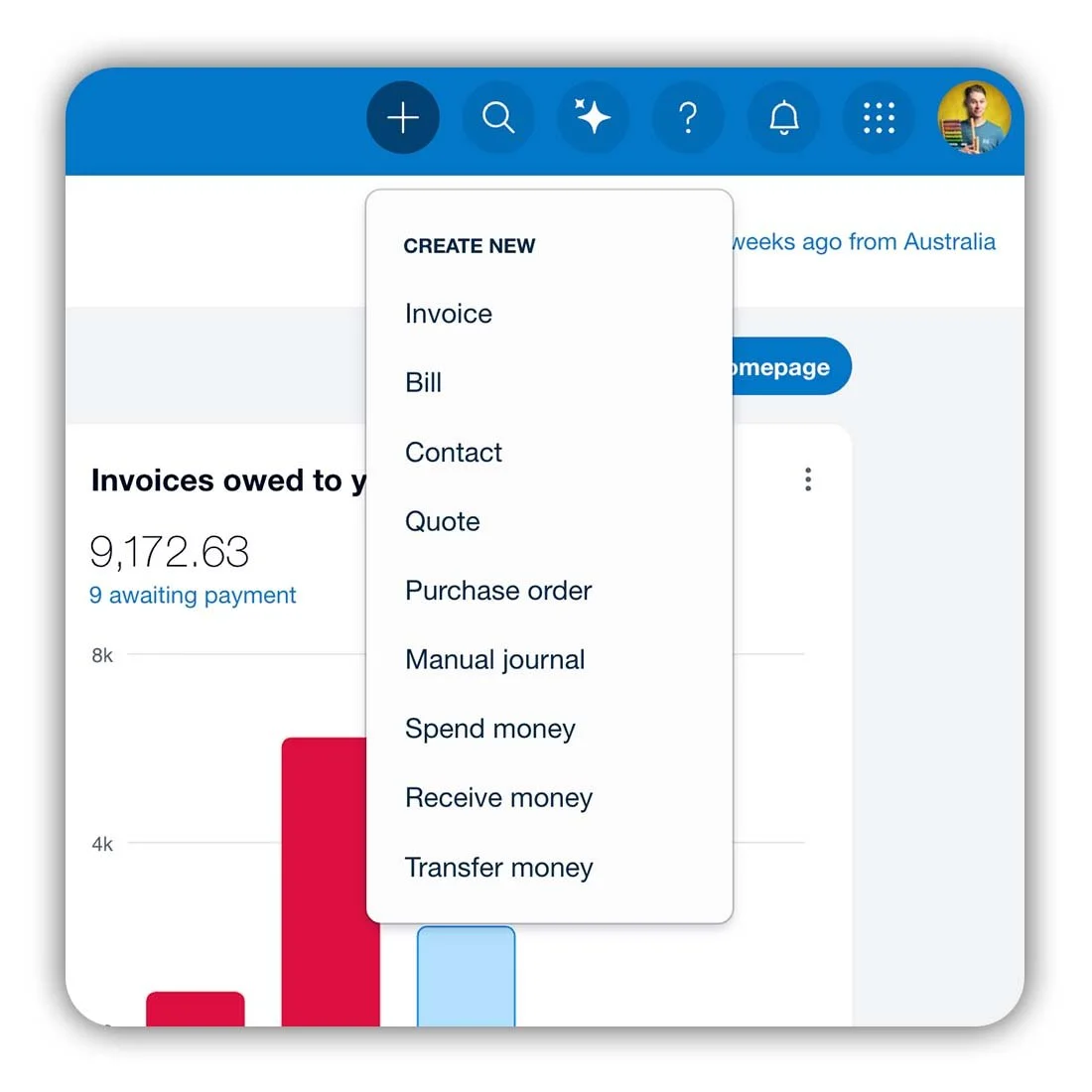
The “Create New” button in Xero.
Spend a few minutes exploring the Dashboard and navigation bar and you’ll quickly get a feel for how Xero is laid out. Once you know where things live, it becomes much easier to work efficiently. Next, let’s look at the key updates in the Xero interface and why they’re worth knowing about.
Xero New Interface 2026 – What’s Changed?
Xero’s interface has been refreshed heading into 2026, with the biggest change being a new, insight-rich homepage. The goal isn’t to change how accounting works in Xero, but to help you understand your numbers faster and take action more easily.
Some of the key changes you’ll notice include:
New homepage with performance insights: The dashboard has been redesigned to show key information like net profit or loss, cash flow, recent invoice payments, and balances right on the homepage. Without needing to run separate reports.
More actionable widgets: Widgets now highlight tasks that need attention, such as bank reconciliations, overdue invoices, and unpaid bills. Many widgets also let you drill into the data more quickly, helping you move from insight to action faster.
Customisable layout: You can personalise the homepage by showing or hiding widgets and saving layouts that suit how you work. This makes it easier to focus on the information that matters most to your business.
Cleaner, more intuitive experience: The overall layout has been refined to reduce clutter and improve usability, making it easier to prioritise tasks and navigate Xero. Especially for new users.
Xero may look different heading into 2026, but its core accounting features remain the same.
Ready to try Xero?
Ready to try Xero for yourself? Start a free trial or access the latest Xero offer to get started right away. It’s the easiest way to explore the updated interface, test the dashboard, and see how Xero handles your day-to-day bookkeeping.
What Do You Think of the New Xero Interface?
I’d love to hear your thoughts. How are you finding the latest Xero layout and navigation changes? Is the updated interface working well for you, or are you still adjusting? Leave a comment below and share your experience. I read every response.